Wednesday, 19 December 2012

Web sites I like


Introduction to blogging
Great teacher who blogs
Website for teaching new tools
Website that explores tools

Very nervous

I'm not sure about other students participating in this course, but I think I am more nervous about peers seeing my synopsis than the lecturers, even though they are the markers and I only know one other student. Why is that?

Tuesday, 18 December 2012

Free technology for teachers

Have found another great website that explores technology in education, Google will you never stop enticing me to investigate what's out there in the technological world of everything.

Blogging etiquette

Have been wondering about people commenting on my blog, is it polite to say thank you, is it not expected? Written thank yous for gift giving or favours have been instilled in some people from a young age. With new technology comes new rules, what is expected, what is OK and what is downright rude. Well, of course I found it with the help of my close intimate friend Google, blogging etiquette has many sites, however I was specifically looking for responding to comments on my blog and found a great blog that elaborates on not only commenting, the creator also explores the content of the appropriate response to comments.

What if I want to repeat in my blog what someone else says in their blog? Found a great website that answers this question. http://www.teachgennow.com.au/ is a free e-newsletter that elaborates on tools and sites available and how to use them. 

Here is another blog post that helps teachers with a rubric

Friday, 14 December 2012

off the beaten track

Have just researched when to use single or double quotation marks when writing, of course I found the answer online in a great ESL site. I have found many great answers to English writing questions on ESL sites. Does that mean we English speakers think we know everything?

Wednesday, 12 December 2012

Google and iPads

In a past life I ran a school library, in that library I used Google Calendar for the library timetable, the computer lab timetable, the boardroom and the small private tute room. I set it up with colour coding and found this easily accessible for teachers and myself and it eliminated double booking, which had been a problem in the past. In the classroom I see Google calendar as a valuable tool for students, parents and teachers alike can utilise this to create better organisational skills.


Google also supplies us with many tools that are accessible from anywhere, be it school or home. For example Google docs and Google PowerPoint are great for collaborative work when the participants are not always in the same room. Students can successfully participate in these without fear of their information being deleted. These are both great planning and presenting tools that can be accessed using any computer, laptop, iPad or mobile device anywhere with internet connection.

Then we are blessed with Google earth, images, maps; the list is endless. These Google gods give us many opportunities to learn about our world, environment and people within it. Sadly this also opens us up to opportunities to view less than desirable information, not always truthful.

I am very greatful for my Ipad. Thanks to my iPad I am now a musician because I have virtuoso, I am a digital enhancer thanks to toon camera, magic video, twist, sketch, posterHD-lite, PToonHDLT and PopBooth.


I am able to throw a pot and sell it with Pottery HD Lite. Here is one I made earlier.
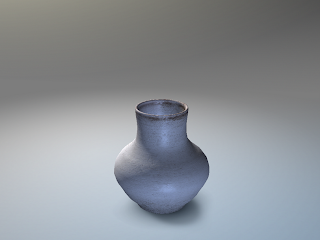

And then there are the games. Educational games of course, many games for Maths, English or any learning area. Ipads are quite versatile as a tool as this YouTube shows. 
There is many examples of iPad use in the classroom.

There is an app that takes dictation. In learning I believe this may be a great tool for students that struggle with written language. The students may use an Ipad to recount or narrate text. This then may enable them the opportunity to write their own piece of text. 

The iPad was also used to demonstrate my dog training abilities. There was a reason for three recordings, even though he is very cute! I believe this to be a great tool for students to record their own progress in a number of ways. Initially, students may develop confidence in speaking in front of peers. Secondly students may view themselves in a reflective way to enable them to see where they may improve their verbal skills. Finally they may assist their peers in cool and warm feedback to further develop these skills.

I have used an IPad in the classroom for students to use with a maths manipulative to explain fractions. This was recorded by another student and shown to the class. The response was very positive for a number of reasons. Students were able to make meaning with the resources as well as hone their verbal skills. The other student was able to film thereby acquiring another skill. Finally these mini movies can be uploaded to another site for other students to utilise. I see iPads being used for demonstration purposes as well to assist any type of learning. In the classroom I have also witnessed iPads being used as timers in science. As it is a large screen all students were able to view the timer which added to the excitement of the experiments as they began to count down together. This meant students remained engaged for the whole lesson, not just their own segment.

When used for authentic learning iPads can be an asset to the classroom.

Tuesday, 11 December 2012

Yeh! Charlie


The first time I recorded this it was upside down when I played it, note to self make sure the circley bit is on the right.
This time I have recorded Charlie obeying the rules for food (of course), students could also use iPads to track their progression or techniques, whether it is oral assessment (debating, retelling a story) or explaining a concept (showing fractions with manipulatives). iPads can be used to assist students in a safe environment where they may stretch themselves out of their comfort zones and explore verbal expression.

Charlie again

Here is Charlie being obedient, not. This time I have used an iPad successfully, phew.

What's in a name

Sometimes I wonder if I am uploading, downloading, embedding, logging in or on, logging out, installing, using elements, tools, where to next? I think I will need to begin a technology glossary. Thank you Google of course there is a technology glossary (for Kids).

Charlie

Here is my dog Charlie, so obedient, he is 15 years old. I tried to use an iPad to record, but was unable to email it to my PC (this time). Have opted for my daughter's boyfriend's smart phone to record my scruffy little dog and emailed it to my PC to upload into my blog. 

Inanimate Alice addiction

Am addicted to inanimate alice thanks to Kirschty. I can't believe you can view surrealism in a multi-media format. Now I am torn between wanting to know the history of the creator or relishing in the mystery of who they may be...


iTeach Inanimate Alice

Thursday, 6 December 2012

On the soap box


PLEASE WATCH as future Learning Managers this may give you an insight into students with Asperger's Syndrome. As a parent of two children with Aspergers this made me cry as it hit the nail on the head. In your classroom you are most likely to have several students who have strong Aspergic traits (some, especially girls, may not be diagnosed)

My wonderful daughter found this and posted it on Facebook:

Wednesday, 5 December 2012

QR code, loving it

OK, so now I am beginning to understand, QR codes allow for more data storage and digital presentation. Absolutely amazing and it looks like this. I have often wondered what is was that I saw on occasion. Found a great blog that explained QR codes simply. 

QR code?

"QR Code (abbreviated from Quick Response Code) is the trademark for a type of matrix barcode (or two-dimensional code) first designed for the automotive industry. More recently, the system has become popular outside the industry due to its fast readability and large storage capacity compared to standard UPC barcodes. The code consists of black modules (square dots) arranged in a square pattern on a white background. The information encoded can be made up of four standardized kinds ("modes") of data (numeric, alphanumeric, byte/binary, Kanji), or through supported extensions, virtually any kind of data.
This definition comes from Wikipedia

Had no idea, still confused as to why and how I need this. Needs further investigation.

ipads in the classroom

Worked in a classroom with 2 iPads for placement, went out and bought one. What a toy, I mean learning tool. So many apps and so little time, classrooms may benefit from iPads whether it be 2 only or 1:1. Found a YouTube that explores their use in a lower primary classroom.

Saturday, 1 December 2012

Questionable uploading of powerpoint

Well, that was interesting, uploading large files without publicly sharing, nearly impossible. File size is limited unless you upgrade in weebly (only 5mb) that's nothing when I have a lot to say. Am wondering how we go sharing images of people's artwork, many do not like even when it is referenced. For this reason I chose not to upload the presentation I am currently using in my art course. Whilst it will be shown to peers, it is not for publication online.